AI automation vs hiring an admin: what does each really cost?
An admin costs far more than the wage. Compare hiring with AI automation using real BLS and Job Bank wage data, a simple formula and a 15-minute estimate.
The short answer
An admin costs the wage plus employer costs: in the US, benefits add about 46% for office staff (BLS, June 2026). AI automation costs a setup fee, a monthly fee and time to review exceptions. Price one task both ways with people × hours a day × loaded hourly cost × working days. Automate rule-based volume; hire for people skills.
Key takeaways
- Compare using the loaded hourly cost, not the wage: for US office and administrative support staff, benefits added about 46% on top of wages in June 2026.
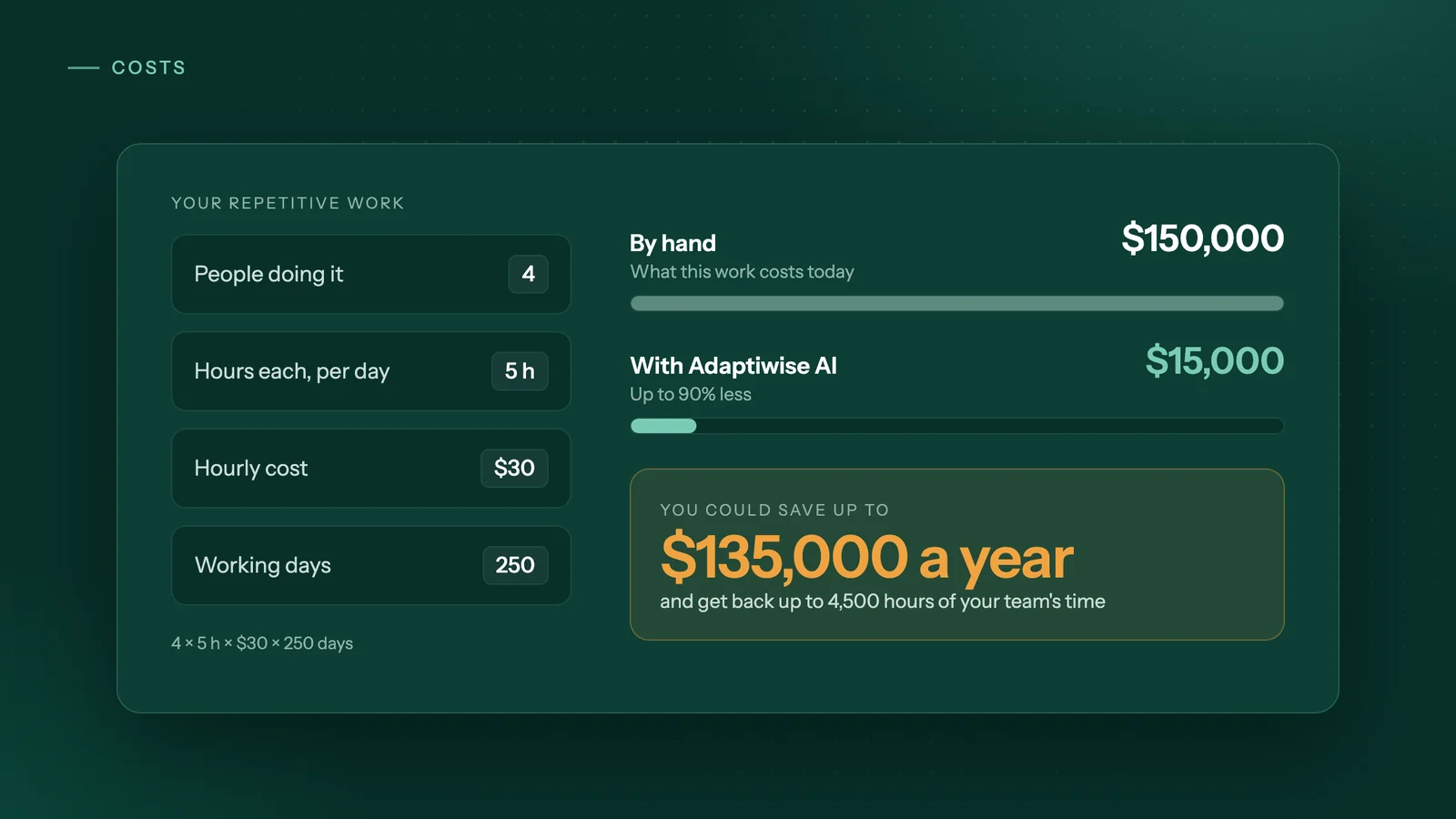
- The yearly cost of a task is people × hours a day × loaded hourly cost × working days, so 4 people × 5 hours × $30 × 250 days is $150,000.
- Count the full cost of automation too: the setup fee, the monthly fee and the staff time spent reviewing exceptions and approving payments or submissions.
- Automation fits repetitive, high-volume computer work with fixed steps, while hiring is the better choice for work built on relationships, discretion or low volume.
- Automation takes over the repetitive part of a role, so a business can handle more volume without adding payroll for data entry.
How much does an admin really cost per hour?
An admin costs their hourly wage plus everything the employer pays on top: payroll taxes, paid leave, insurance and retirement contributions. In the US that adds about 46% to the wage for office staff. In Canada, the legally required contributions alone add about 8%, before paid time off and benefits.
Start with real wage data. These are medians, so half of workers in each group earn more and half earn less.
| Occupation | Country | Median wage per hour | Source and date |
|---|---|---|---|
| General office clerks | US | US$21.64 | BLS, May 2025 |
| Secretaries and administrative assistants | US | US$23.23 | BLS, May 2025 |
| General office support workers (NOC 14100) | Canada | CA$23.99 | Job Bank, accessed October 2026 |
Now add employer costs. The BLS Employer Costs for Employee Compensation survey found that in June 2026, private employers spent $25.22 an hour on wages and $11.51 on benefits for office and administrative support workers: $36.73 per hour worked in total. That is about 46 cents of benefits on top of every wage dollar.
Apply that ratio to the medians and a general office clerk costs about US$31.50 an hour, and an administrative assistant about US$33.80. These are national averages; your own payroll records are a better number if you have them.
In Canada, employers pay CPP contributions of 5.95% in 2026 and EI premiums of 1.4 times the 1.63% employee rate, about 2.28%, up to yearly maximums. On the CA$23.99 median, that is roughly CA$26 an hour before paid time off and any health or dental plan you offer.
How do you calculate the yearly cost of a repetitive task?
Multiply the number of people who do the task by the hours a day each spends on it, the loaded hourly cost, and the working days in a year. Use the loaded cost from the section above, not the wage.
| Example task | People | Hours a day each | Loaded cost per hour | Working days | Cost per year |
|---|---|---|---|---|---|
| Keying supplier invoices into accounting software | 1 | 1 | $30 | 250 | $7,500 |
| Checking portals for new orders and updating a spreadsheet | 2 | 1.5 | $30 | 250 | $22,500 |
| Data entry and portal work across a team | 4 | 5 | $30 | 250 | $150,000 |
These rows are illustrations, not client results. $30 is a round loaded rate close to the US figures above; replace it with your own.
Adaptiwise AI designs workflows to cut the cost of the automated work by up to 90%. In the last row, that means up to $135,000 a year saved on $150,000 of work. It is an "up to" figure, not a promise: how close you get depends on how many cases still need a person and on the fees in your quote. Try your own numbers in the Adaptiwise AI savings calculator.
That last row is 5,000 hours a year of typing and clicking. Automating it does not mean four people leave. It means those hours go to customers, follow-ups and the work you hired them for.
How much does AI automation cost for a small business?
There is no single price, because vendors charge in different ways. Most use one of three models, and each gives a different total for the same task.
| Pricing model | How it works | Example (as of October 2026) | Who builds it |
|---|---|---|---|
| Per task | You buy a monthly allowance of actions | Zapier: a task is used when a Zap successfully moves data or completes an action; triggers do not count | You |
| Per user and per robot | You pay for user seats and for robots that run unattended | UiPath: plans are built from users and unattended robots; Standard and Enterprise are priced through sales | Your staff or a consultant |
| Setup plus monthly | A one-time build fee, then a monthly fee to run and maintain it | Adaptiwise AI: setup based on systems, steps and exceptions; monthly fee based on how often it runs | The provider |
Per-task tools are cheap to start and are the right choice when both apps already have a connector and volumes are modest. Watch the limit: on Zapier, going over your task allowance either pauses your Zaps or bills extra tasks at a higher rate. Robot-based platforms suit larger teams with someone to build and maintain the bots. We compare all three in AI agents vs Zapier vs RPA.
Adaptiwise AI does not publish a price list. After a free 30-minute assessment by video call, you get a written plan with the setup fee, the monthly fee, flexible payment options and the expected saving.
For a year-one comparison, add up: setup fee + 12 × monthly fee + (hours a week reviewing exceptions × loaded hourly cost × 50 weeks). Compare that with the yearly cost from the table above. From year two, the setup fee drops out.
What hidden costs should you count on each side?
Both options cost more than the headline number. A fair comparison includes your team's time, not just the wage bill or the invoice.
Hiring
- Recruiting: writing the ad, screening, interviews, and any agency or job-board fees.
- Training: the weeks before a new person is fully up to speed, plus the time of whoever trains them.
- Paid leave: in the BLS data above, paid leave was 7.5% of total compensation for office and administrative support workers. The work still needs doing on those days.
- Turnover: when someone leaves, you pay for recruiting and training again.
- Errors and supervision: retyped data has typos, and someone has to check and correct them.
Automation
- Your setup time: walking through the process, sharing sample files and giving test access.
- Exceptions: cases that do not fit the rules and need a person to review them.
- Approvals: payments and submissions that a person should sign off.
- Website changes: when a portal changes its layout, a step may need fixing.
- Process changes: a new supplier, form or software can mean updating the workflow. Ask any vendor what the monthly fee covers.
How can you estimate your own number in 15 minutes?
Pick one task, time it, and price it with the formula above. A reasonable estimate is enough to decide whether a closer look is worthwhile.
- Pick one task that follows the same steps every time, such as downloading bank statements and matching them at month-end.
- Write down who does it and how many minutes a day each person spends. For weekly or monthly tasks, convert to a daily average.
- Find each person's hourly wage in payroll, then add employer costs: about 46% in the US for office staff, or CPP, EI, paid time off and benefits in Canada.
- Use 250 working days unless you know your own figure.
- Multiply: people × hours a day × loaded hourly cost × working days.
- Add rework: hours a month spent fixing errors from this task × loaded hourly cost × 12.
- Note what must stay with a person: exceptions, approvals and anything that needs a phone call.
- Enter the result in the savings calculator to see what up to 90% less would mean for you.
Which tasks are worth automating, and when is hiring better?
Automate work that is repetitive, rule-based and frequent. Hire for work that depends on relationships, discretion or variety.
| Signs a task is worth automating | Signs it is not worth automating |
|---|---|
| Same steps every time | Steps change with every case |
| Runs daily, weekly or in large monthly batches | Happens a few times a year |
| Takes 30 minutes or more of someone's day | Takes a few minutes a week |
| Moves data between portals, PDFs, emails and spreadsheets | Depends on phone calls, negotiation or reading people |
| Retyping errors are costly | The process or software is about to change |
| Can be written down as a checklist | Nobody can explain how it is done |
Hiring is the better choice when the role is mostly about people: answering the phone, calming upset customers, negotiating with suppliers. It also wins when volume is too low to repay a setup fee, or when the work changes so often that nobody can write the rules down. A part-time person who covers ten small, varied jobs may be worth more than automating one of them.
Often the answer is both. Automation takes the repetitive part of a role, not the person. As volume grows, the workflow simply runs more often, so you can take on more orders or clients without adding payroll for data entry.
How would Adaptiwise AI handle the comparison?
Adaptiwise AI starts with a free 30-minute assessment by video call, maps the task's systems, steps and exceptions, and gives a written plan with the price, flexible payment options and the expected saving. You can then set it against your own yearly cost.
The agents do the computer work a person does now: sign in to portals, download and upload files, read PDFs and emails, fill in forms and move data into spreadsheets and business software. Workflow steps are fixed; AI reads pages and documents whose layout changes. When something does not fit, the agent stops and asks a person instead of guessing. Payments, submissions and unfamiliar screens wait for approval.
Every run is logged with status and timing. If a run fails, an Adaptiwise AI operator is alerted, and the fix is proven on a replay before the workflow is trusted again. Through an integration such as Google Sheets, thousands of records can be entered and checked in minutes; work inside a website moves at that site's pace, so it usually runs overnight. The workflow can run on your own computer, in a hybrid setup or on Adaptiwise AI's servers in Canada. Book a free assessment to get your number.
Frequently asked questions
How long does it take for automation to pay for itself?
Divide the one-time setup fee by the net monthly saving. The net monthly saving is what the task costs you each month today, minus the monthly automation fee and the cost of staff time spent on exceptions. If the setup fee equals three months of net saving, payback is three months. Daily, high-volume tasks pay back fastest; tasks done a few times a year may never pay back.
Will automating admin work mean letting staff go?
Not necessarily. Automation takes over repetitive steps such as copying data between portals and spreadsheets, while people keep the work that needs conversation, discretion and approval. The freed hours can go to customer follow-up, sales or other work the business has been putting off, which lets it take on more volume without hiring extra people just for data entry.
Should I count my own time if I do the admin work myself?
Yes. Price your hours at what you would pay someone else to do the task, or at what an hour of selling or client work is worth to the business, whichever is higher. It is easy to undercount owner time because no invoice arrives, but every evening spent on data entry is time not spent winning or serving customers.
Is a part-time assistant cheaper than automation?
It can be. If the task takes only a few hours a week, or the same person also answers the phone and looks after customers, a part-time hire may cost less than a setup fee plus a monthly fee. Price both the same way: yearly hours times the loaded hourly cost for the hire, and setup plus twelve monthly fees plus review time for automation.
Why does Adaptiwise AI not publish a price list?
Because the cost depends on the workflow. The one-time setup fee is based on how many systems, steps and exceptions are involved, and the monthly fee on how often the workflow runs. After a free 30-minute assessment by video call, Adaptiwise AI gives a written plan with the price, flexible payment options and the expected saving, so you can compare it with what the work costs you today.
Sources
- Occupational Outlook Handbook: General Office Clerks (pay, May 2025)U.S. Bureau of Labor Statistics. Accessed October 8, 2026.
- Occupational Outlook Handbook: Secretaries and Administrative Assistants (pay, May 2025)U.S. Bureau of Labor Statistics. Accessed October 8, 2026.
- Employer Costs for Employee Compensation, Table 4: Private industry workers by occupational and industry group, June 2026U.S. Bureau of Labor Statistics. Accessed October 8, 2026.
- General office support workers (NOC 14100): occupation summary, CanadaGovernment of Canada, Job Bank. Accessed October 8, 2026.
- CPP contribution rates, maximums and exemptionsCanada Revenue Agency. Accessed October 8, 2026.
- EI premium rates and maximumsCanada Revenue Agency. Accessed October 8, 2026.
- Zapier pricingZapier. Accessed October 8, 2026.
- UiPath pricingUiPath. Accessed October 8, 2026.
Third-party prices and product details change. Figures were checked on October 8, 2026. This guide is general information, not legal, tax or financial advice.
Keep reading
All guides → Privacy
Can AI automation run offline? A guide to private, on-device AI agents
Yes, if the AI model and agent run on your own computer. See where cloud AI sends data, what works offline, the trade-offs, and how to check a workflow.
 Comparisons
AI agents vs Zapier vs RPA: which automation fits a small business?
AI agents vs Zapier vs RPA vs hiring: how each works, how each is priced and where each wins, plus a step-by-step guide to choosing for a small business.
 Trucking & logistics
How to automate rate confirmations into your TMS
Stop retyping broker rate cons into your TMS: fields to extract, checks to run, where people stay in the loop, and how to invoice the day it delivers.