Can AI automation run offline? A guide to private, on-device AI agents
Yes, if the AI model and agent run on your own computer. See where cloud AI sends data, what works offline, the trade-offs, and how to check a workflow.
The short answer
Yes, partly. AI automation can run offline when both the agent and an open-weight AI model are installed on your own computer, so prompts and documents are not sent to an AI provider. Steps that use only local files and desktop software can run with the internet off; steps that use a website still need to reach that website.
Key takeaways
- Cloud AI tools process your prompts and files on the provider's servers, and what the provider keeps depends on the plan and terms you use.
- On-device AI runs an open-weight model on hardware you control, so the content it reads is not sent to an AI provider.
- Work in local files and desktop software can run with the internet off, but any step that uses a website still has to connect to that website.
- Canada's PIPEDA does not prohibit using a service provider to process personal information, but the business that transfers it stays accountable for it.
- On-device AI suits confidential, file-based work on one reliable computer; it is a poor fit for web-heavy work or teams spread across locations.
Does AI send your data to the cloud?
With most AI tools, yes. When you paste a client letter into a chatbot or connect a cloud automation tool to your files, the text and documents go to the provider's servers for processing. What happens next depends on the plan and terms you agreed to.
Terms differ between providers, and even between plans from the same provider. OpenAI's help page on how your data is used to improve model performance says content from its services for individuals, such as ChatGPT, may be used to train its models unless you opt out. The same page says inputs and outputs from ChatGPT Business, Enterprise, Edu and its API are not used for training by default.
Not training on your data is not the same as not keeping it. OpenAI's enterprise privacy page says it may retain API inputs and outputs for up to 30 days to provide the services and identify abuse, with zero data retention available for eligible endpoints and use cases.
None of this makes cloud AI unsafe. It means your data goes to someone else's servers, under terms you should read for the exact plan you use. For a clinic, accounting firm or law office, that may not sit well with client contracts or internal policy.
What is on-device AI, and can it run offline?
On-device (or local) AI means an AI model runs on hardware you control, such as an office computer, instead of on a provider's servers. If the model, the automation software and the files are all on that computer, work that touches only those files can run with the internet switched off.
The model is usually an open-weight model: one whose files you can download and run yourself. A local runtime loads it and answers requests on your machine. llama.cpp, for example, describes its main goal as running models "with minimal setup" on a wide range of hardware, and the Ollama FAQ states that "Ollama runs locally, and conversation data does not leave your machine." These are examples, not recommendations.
There is a catch: the same FAQ notes that Ollama pulls models from the internet. Setup and updates need a connection; the day-to-day work can stay on the machine.
An AI agent is software that uses the model to read screens and documents, decide the next step, then click, type and file things. For automation to stay private, the agent and the model both have to run locally. Here is what that means for typical steps:
| Step in a workflow | Works with the internet off? | Why |
|---|---|---|
| Reading PDFs and scans saved on the computer | Yes | The files and the model are both local |
| Entering data into desktop software on that computer | Yes, if that software works offline | Some desktop apps sync to the cloud |
| Updating a spreadsheet saved on the computer | Yes | It is a local file |
| Updating Google Sheets | No | It is an online service |
| Downloading statements or remittances from a portal | No | It has to reach that website, as staff would |
| Emailing a summary | No | It needs your mail server |
| Installing or updating the AI model | No | The model files have to be downloaded first |
The pattern is simple: anything that lives on the computer can stay offline, and anything that lives on a website needs that website. A workflow like insurance remittance posting often mixes both, so check each step separately.
What are the trade-offs of cloud, hybrid and on-device AI?
You trade convenience and access to a provider's hosted models for control over where your data goes. Hybrid sits in between: the work runs on your computer, and only basic status information goes online. "Hybrid" means different things to different vendors, so always ask exactly what leaves the machine.
| Cloud | Hybrid | Fully on-device | |
|---|---|---|---|
| Where the work and the AI model run | Provider's servers | Your computer | Your computer |
| What leaves your computer | Prompts, documents and page content | Short status updates | Nothing beyond the websites a task uses |
| Internet needed | Always | For status updates and web steps | Only for web steps, setup and updates |
| Hardware you supply | None beyond a browser | A computer that is on during runs | The same, with enough memory for the model |
| Model choice | Provider's hosted models | What runs well on your hardware | What runs well on your hardware |
| Who looks after the machine | The provider | You or your IT provider | You or your IT provider |
| Best fit | Web-based work, spread-out teams | Confidential work that needs remote oversight | The most sensitive files and desktop-only work |
Hardware and speed
The model has to fit in your computer's memory: Ollama's FAQ refers to system memory for processor-based runs and graphics-card memory (VRAM) for GPU runs. llama.cpp supports ordinary processors, Apple silicon and NVIDIA graphics cards, plus compressed ("quantized") models that use less memory. In plain terms, you need a modern computer with enough memory, and speed depends on that machine.
Capability
You choose from models that run well locally, not from everything a cloud provider offers. For narrow, repeatable jobs, such as reading the same kind of form each day, that may be enough. Test on your own documents first.
Maintenance
Someone has to keep the computer on during runs, apply updates, refresh the model and fix failures. In the cloud, the provider handles most of that.
What do privacy rules ask of small businesses?
In general, privacy rules ask you to stay responsible for personal information, protect it with suitable safeguards, be open about how you handle it, and have contracts with anyone who processes it for you. This is a general overview, not legal advice.
- Canada (PIPEDA). The Office of the Privacy Commissioner of Canada sums up the law as ten fair information principles, including accountability ("your organization is responsible for personal information under its control") and safeguards against "loss, theft, unauthorized access." Its guidelines for processing personal data across borders say PIPEDA does not prohibit transferring personal information to a service provider for processing, but the transferring business stays accountable, must be transparent, and protects the data mainly through contracts.
- European Union (GDPR). The European Commission explains that the business deciding why and how data is processed is the data controller, while a processor works on its behalf under a contract or other legal act that also says what happens to the data when the contract ends.
- US health care (HIPAA). The US Department of Health and Human Services says a cloud service provider that handles electronic protected health information for a covered health care provider is a business associate and must sign a business associate agreement, even if it stores only encrypted data and has no key.
Running AI on your own computer can make it easier to keep client data where your obligations expect it, because no AI provider receives it. It does not make you compliant by itself: the computer still needs safeguards such as limited logins, disk encryption and backups. Confirm your setup with your privacy officer or advisor, especially if you hold client files as a law firm or accounting practice.
How do you check if a workflow can run fully on-device?
List every step and every system it touches, then mark which ones live on your computer and which live online. If every step is local, the workflow can run fully on-device; if some steps use websites, plan for those connections.
- Write the workflow down step by step. Include where each file comes from and where each result goes.
- Mark each system as local or online. Local means files and offline desktop software; online means websites, portals, cloud apps and email.
- Classify the data. Note which steps involve health, legal, financial or identity information, and what your contracts and privacy obligations say about where it may go.
- Define what the AI must do. Reading a familiar form is a narrower job than drafting advice. Test a local model on real samples, on the same computer, before committing.
- Choose the computer. It must be on during runs, have enough memory for the model, and be locked down with limited logins, disk encryption and backups.
- Decide who maintains it. Name the person or provider responsible for updates, model changes and fixing failed runs.
- Pilot with a person checking. Compare the agent's output with a staff member's work for a few weeks before you rely on it.
When is on-device AI not worth it?
On-device AI is not worth it when the work lives online anyway, when there is no reliable computer to run it on, or when the job needs more than a local model can do.
- The work is mostly web-based. If every step happens in online portals and cloud software, your data already sits with those services. Running the AI locally still keeps it away from an AI provider, but the gain is smaller and you still need the internet.
- Your team is spread across locations. If nobody works from one office computer that stays on, a hosted setup is easier to run and check.
- You have no suitable computer. Buying and looking after one may cost more than the risk you are reducing, especially for low-sensitivity data.
- The task needs the strongest models. Open-ended writing or complex reasoning may be better served by a hosted model under business terms you have reviewed.
- Your apps already connect to each other. If the job is moving data between cloud apps, a cloud integration tool may be simpler. Our comparison of AI agents, Zapier and RPA explains when each fits.
How does Adaptiwise AI run private automation?
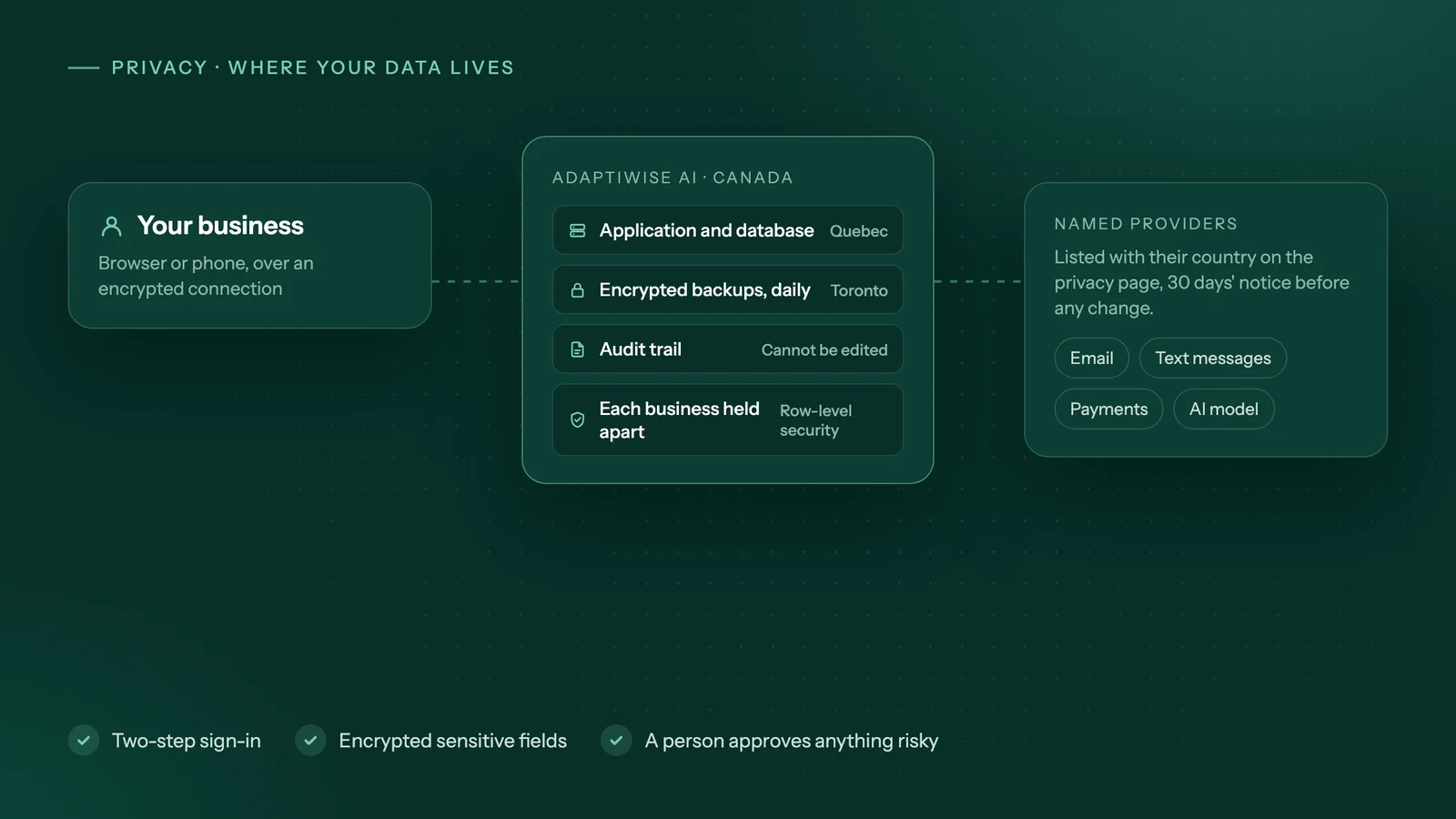
Adaptiwise AI builds and runs AI agents for small businesses, and the same workflow can run in three ways, described in our privacy overview:
- On your computer. The agent and the AI model that plans its steps run on a computer in your office, so your files and logins stay there. A task that uses a website connects only to that website, the same way staff would.
- Hybrid. Runs happen on your computer, and only short status updates reach your online portal, never page content, logins or screenshots.
- We host it. Runs happen on Adaptiwise AI's servers in Canada. Each business's records are kept apart, every access is recorded, and the providers used, including the AI model, are listed with their countries on the privacy page, with 30 days of notice before any change.
Workflow steps are fixed, and the agent stops and asks a person instead of guessing. Payments, submissions and unfamiliar screens wait for a person to approve. You get a written plan with the price, flexible payment options and the expected saving after a free 30-minute assessment, where we can work through the checklist above together.
Frequently asked questions
Do I need the internet to set up a local AI model?
Usually yes, at least once. The model files and the software that runs them have to be downloaded, or copied onto the computer from another device. After that, work that only touches files and software on that computer can stay on the machine. Plan for occasional connected sessions to apply security updates and newer model versions.
Is on-device AI automatically more secure than cloud AI?
No. Running AI locally removes one party, the AI provider, from the path your data travels, but the computer itself becomes the thing to protect. It needs limited user accounts, disk encryption, backups, current updates and physical security. A well-run cloud service can be safer than a neglected office computer, so judge the whole setup, not just where the model runs.
Does a business AI plan mean the provider never stores my data?
Not necessarily. OpenAI, for example, says it does not train on business or API data by default, but it may keep API inputs and outputs for up to 30 days to provide the service and identify abuse, with zero data retention only for eligible cases. Other providers set their own terms, so read the policy for the exact plan you use.
What happens to scheduled automations if the computer is turned off?
They do not run. An on-device agent can only work while its computer is on and awake. Choose a machine that is not shut down each night, set its power options so it does not sleep during scheduled runs, and decide who will notice and restart it if a run is missed. Website work is often scheduled overnight or before staff start, so plan for those hours.
Does Adaptiwise AI run on my computer?
It can. In the on-your-computer setup the agent and the AI model run on a computer in your office, and your files and logins stay there. In the hybrid setup the runs stay on your computer and only short status updates reach your online portal. When Adaptiwise AI hosts it, runs happen on its servers in Canada, each business's records are kept apart, and the providers it uses, including the AI model, are listed on its privacy page.
Sources
- How your data is used to improve model performanceOpenAI Help Center. Accessed October 8, 2026.
- Enterprise privacy at OpenAIOpenAI. Accessed October 8, 2026.
- llama.cpp: LLM inference in C/C++ (README)ggml-org on GitHub. Accessed October 8, 2026.
- Ollama FAQOllama on GitHub. Accessed October 8, 2026.
- Speaking Notes for the PIPEDA presentation package for businessesOffice of the Privacy Commissioner of Canada. Accessed October 8, 2026.
- Guidelines for processing personal data across bordersOffice of the Privacy Commissioner of Canada. Accessed October 8, 2026.
- What is a data controller or a data processor?European Commission. Accessed October 8, 2026.
- Guidance on HIPAA & Cloud ComputingU.S. Department of Health and Human Services. Accessed October 8, 2026.
Third-party prices and product details change. Figures were checked on October 8, 2026. This guide is general information, not legal, tax or financial advice.
Keep reading
All guides →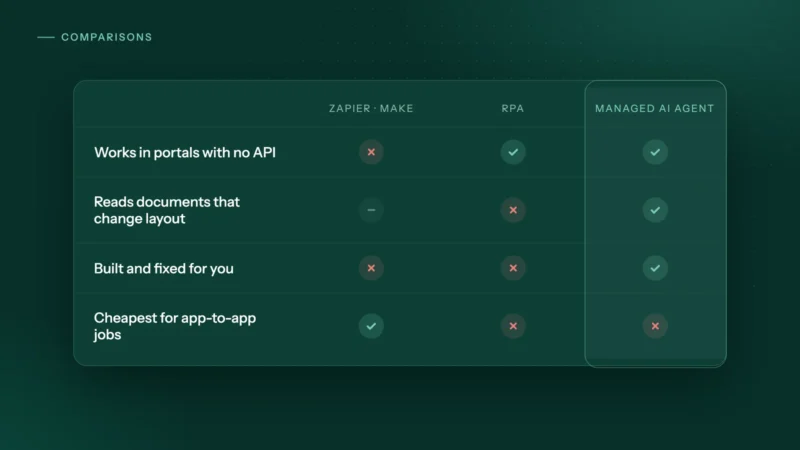 Comparisons
AI agents vs Zapier vs RPA: which automation fits a small business?
AI agents vs Zapier vs RPA vs hiring: how each works, how each is priced and where each wins, plus a step-by-step guide to choosing for a small business.
 Costs
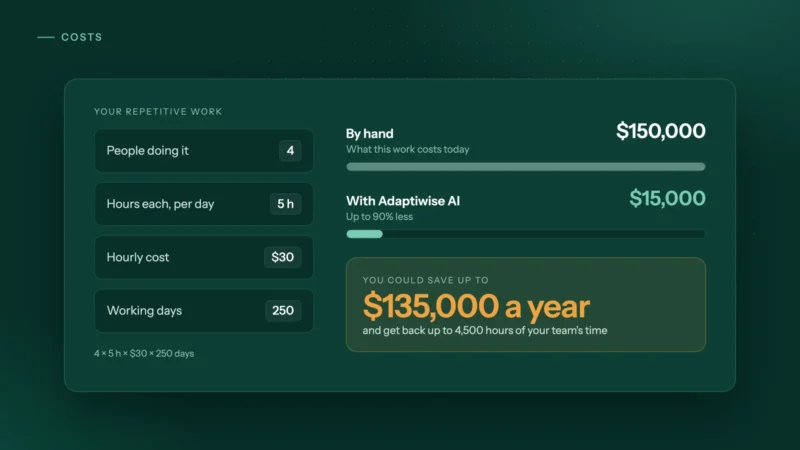
CostsAI automation vs hiring an admin: what does each really cost?
An admin costs far more than the wage. Compare hiring with AI automation using real BLS and Job Bank wage data, a simple formula and a 15-minute estimate.
 Trucking & logistics
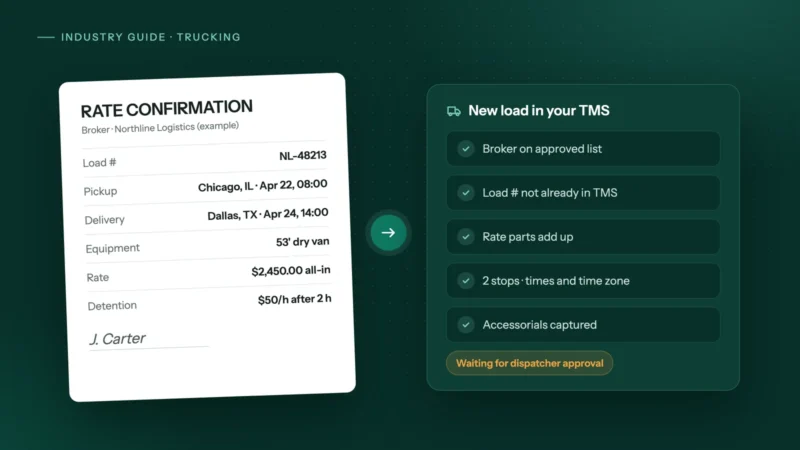
How to automate rate confirmations into your TMS
Stop retyping broker rate cons into your TMS: fields to extract, checks to run, where people stay in the loop, and how to invoice the day it delivers.